

OxygenOS 16 represents OnePlus’s biggest leap yet, basing its new user experience on Android 16, and infusing the update with a blend of advanced AI tools and sleek, glass-inspired aesthetics. The update, rolling out from November 2025, is designed to make everyday interactions smoother, smarter, and visually stunning for millions of OnePlus users worldwide.
Revamped Visuals: The Era of Liquid Glass
One of the flagship innovations of OxygenOS 16 is the Liquid Glass design. Drawing inspiration from Apple’s iOS 26 and Google’s Material 3, this new design introduces Gaussian blur effects across the interface, resulting in a translucent, layered appearance on system widgets, lock screens, and app icons. Curved corners, soft lighting, and subtle glowing animations make the UI feel futuristic yet minimal, letting colours and text breathe against a lightly frosted background.
These changes are seen in:
- Lock screen clocks and widgets, now with a translucent finish
- Calculator, quick settings, and PIN input screens using blurred overlays
- System icons and app categories sporting deeper, more detailed visuals
Despite some visual consistency gaps (not every app fully adopts the Liquid Glass effect), OnePlus balances flair with readability to ensure information stays clear, even in the most stylised contexts.
AI-Powered Productivity: Gemini Integration and Mind Space
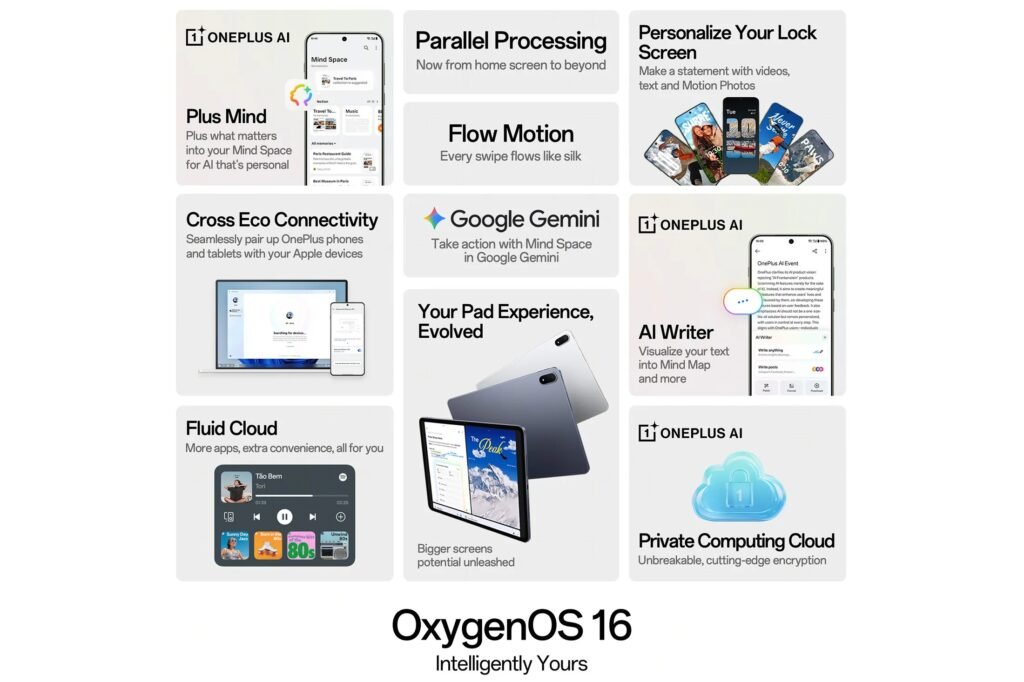
OxygenOS 16 comes fully loaded with Google’s Gemini AI, deeply integrated into the Mind Space hub, a central platform for all things AI on OnePlus devices. Mind Space enables users to:
- Temporarily record on-screen activity and save screenshots.
- Organise and retrieve captured content for smart actions, such as auto-creating calendar events or sending detailed information pulled from images via Gemini’s contextual analysis.
Gemini’s presence transforms the typical Android experience with several practical tools:
- AI Writer: Generate text based on prompts, change tone, create tables/mind maps, and proofread entries from anywhere you can type. It’s ideal for messages, notes, or quick summaries.
- AI Recorder: Real-time voice transcription and speaker identification for easy meeting summaries. AI summarisation makes every recording searchable and actionable.
- AI Scan: Camera mode that automatically frames documents and recognises text at skewed angles, making scanning and document sharing seamless.
- AI Portrait Glow and AI Perfect Shot: Enhance group photos by fixing closed eyes or awkward expressions, while Portrait Glow brightens faces or skin tones in low-light shots.
Together, these features create a more adaptive, user-centric ecosystem that simplifies work, communication, and creativity.
Fluid Motion and Cloud: Smarter Animations and Notifications
Performance is a key pillar of OxygenOS 16. The new Flow Motion Animation engine delivers ultra-fluid transitions, allowing apps to open and switch without lag, making multitasking and gaming smoother than ever. Parallel Processing 2.0 further ensures seamless interactions, overlapping animations, and instant responsiveness, bringing OnePlus closer to a ‘no stutters’ ideal.
The “Fluid Cloud” notification panel draws inspiration from Apple’s Dynamic Island, providing real-time updates for music, deliveries, or sports scores via floating pop-out panels at the top of the screen. These interactive bubbles can display content from third-party apps, such as Spotify, Zomato, or YouTube Music, allowing users to control these apps and view information at a glance, without disrupting the overall UI cleanliness.
Customisation: Free Expression Meets Deep Personalisation
OxygenOS 16 puts a big spotlight on personal taste. The “Breathe With You” and “Thrive with Free Expression” themes offer extensive user-level customisation:
- Dynamic wallpapers and motion backgrounds
- Widget-rich lock screens and home screens
- Adjustable fonts, icons, and layout options via Flux Themes 2.0
Users can personalise every aspect of their device, from arranging icons and quick tiles in settings to choosing which AI features appear on lock screens or within apps.
Enhanced Security & Seamless Device Connectivity
Security is another highlight, with OxygenOS 16 introducing Plus Lock, an encryption suite with eleven distinct security layers. This update adds robust protection for sensitive files while safeguarding phone-to-PC transfer protocols. Whether you’re moving photos, documents, or contacts, OxygenOS 16 syncs easily between OnePlus smartphones and computers, streamlining your daily workflow.
Eligible Devices and Rollout Timeline
The OxygenOS 16 update follows a phased rollout strategy:
- November 2025: OnePlus 13, 13 Pro, 13R, 13 CE, OnePlus Open, OnePlus Pad 2.
- December 2025: OnePlus 11R 5G, 11 CE 5G, Nord CE 5G, Nord CE 5G Lite, OnePlus 12, OnePlus 12R, OnePlus 10 Pro, Nord 4, Nord 3, Nord CE 4, and several Pad models.
Other eligible and supported models will follow in subsequent wave updates through early 2026, ensuring broad coverage for both flagship and mid-range devices.
Verdict: Evolution, Not Revolution
OxygenOS 16 does not strive to reinvent the Android experience; rather, it perfects it for everyday use. Its nuanced visuals, advanced AI integration, and speed optimisation define a new quality standard for OnePlus users. The emphasis on customisation and smart tools elevates productivity and personal flair while maintaining the core principles of clean, fast, and stable Android operation.
With the arrival of OxygenOS 16, OnePlus proves its commitment to user-driven innovation, standing out in the crowded Android landscape by blending polish, intelligence, and efficiency in a package that genuinely adapts to user needs.
Note: For OnePlus users, updating to OxygenOS 16 promises a transition to a future-ready, user-friendly, and visually stunning operating system. The blend of AI productivity, custom visuals, and enhanced fluidity makes OxygenOS 16 a standout update for 2025.